
- Column A: Action
- Use this column to specify the action you want to take. Examples:
ADD,DELETE,UPDATE.
- Use this column to specify the action you want to take. Examples:
- Column B & E: User's Email
- Column B (Current Email): For existing users, enter their current email address here to identify their account for updates.
- Column E (User Email): Enter the user's new or primary email address here. This can be left blank if creating a new user.
- Column C & D: User's Name
- Column C (First Name): The user's first name.
- Column D (Last Name): The user's last name.
- Column F: Role
- This defines the user's permissions on the platform. It is crucial to use the platform's internal role names, not internal job titles.
- Column G: Brand
- This is the Brand the user will be linked to.
- Column H: Site
- Specify the store(s) the user needs to be aligned to. For users who require access to multiple sites, separate each site name with a comma e.g. Demo Site 1, Demo Site 2. The site name needs to reflect exactly what it is listed as on the platform, or the upload will fail.
- Column I: Site Identifier
- Specify site code if your organisation has them linked on the platform. For users who require access to multiple sites, separate each site code with a comma e.g. 1234, 5678, 9101
- Column J: Language
- The Language preferred by user.
- Column K: Timezone
- The Timezone the user needs to be linked to.
- Column L: Is Federated
- This indicates if the user's account is linked to Single Sign-On (SSO).
Using the Bulk Alignment Tool
- Log into a HQ Manager account on the platform.
- Navigate to Organisations > Users
- To download file to update, select Download CSV

- Complete edits on the CSV file using the above guidance and save.
- Return to platform, and select the Upload CSV option
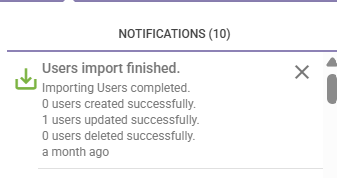
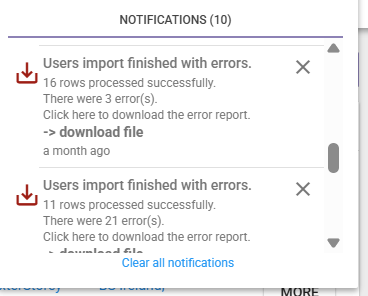
- When the upload is complete, there will be a notification showing:

- This will show you if there are any errors on the file, and will give you the option to download an error file so you can review and amend.
- Contact Support team if Login As needs to be amended.